The agent drafts the work. You approve it.
The Payer Ops Agent maps every payer change to your codes, payers and owners, then drafts the work that follows. Nothing is created, sent or resolved without your approval.
Enterprise pricing is negotiated against your payer mix and seat count. A demo runs in the product, on your payers.
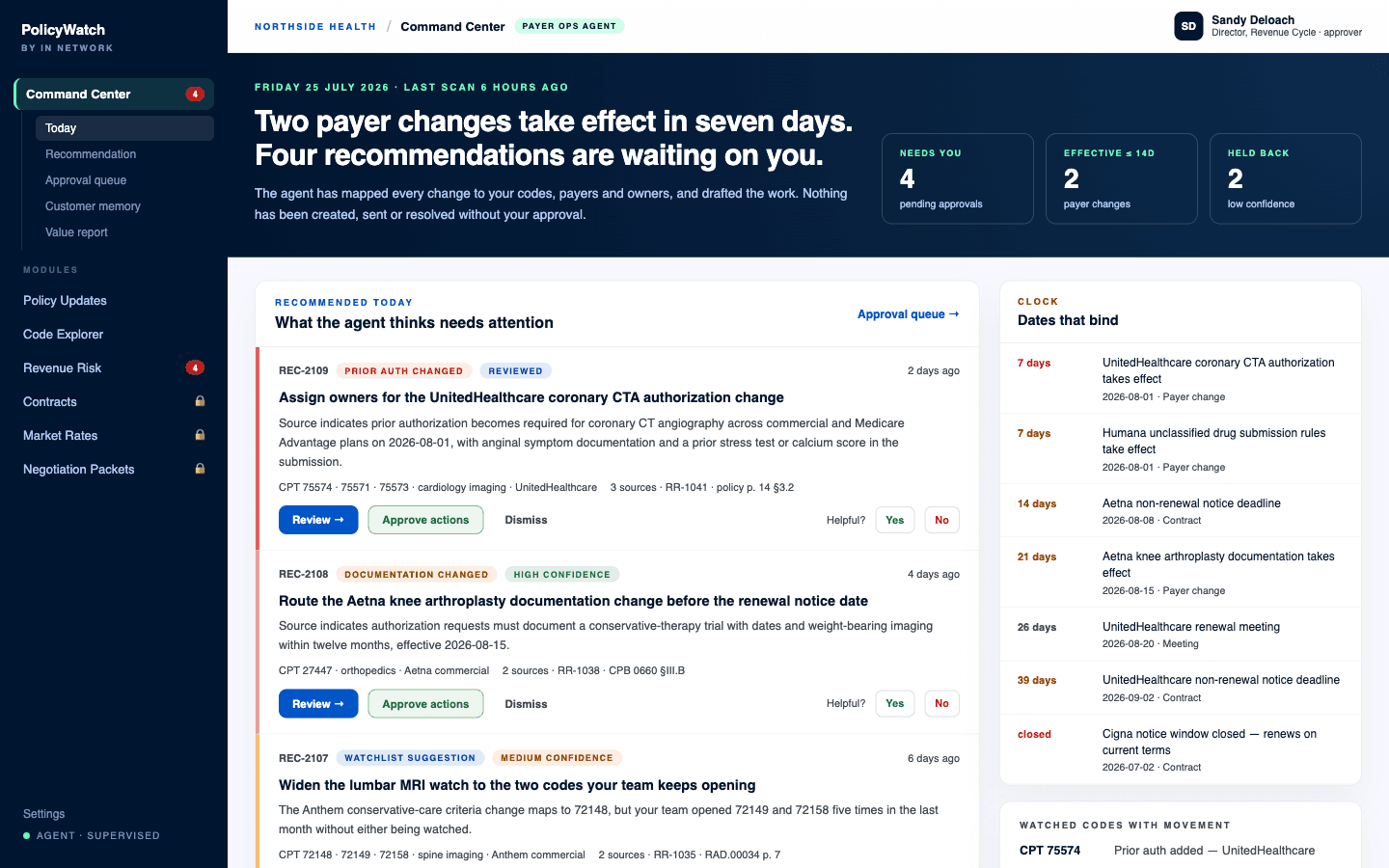
The Command Center dashboard — recommendations, and the clock behind them.
One page that says what today needs
Not a feed, and not an inbox. The dashboard opens on the agent's read of your situation right now: what changed, what is about to take effect, what is waiting on a human, and what the agent is not confident enough to push at you yet.
- Today's payer risks, and the recommended actions behind them
- Pending approvals — work drafted and waiting on a person
- Watched codes with recent movement
- Upcoming effective dates and contract renewal reminders
- A monthly value snapshot, and an explicit count of low-confidence items held back
Recommendations that arrive with their evidence
Every recommendation is a specific piece of work with a source behind it — a named change class, the codes and service line it touches, the payer, the number of sources supporting it, and the policy page and section the language came from. The recommendation says what the source indicates, then says what it thinks you should do about it.
- A change class on every card: prior auth changed, documentation changed, watchlist suggestion
- Review status and confidence, shown before the recommendation text
- Affected codes, service line, payer, source count, and the linked risk item
- Review, approve actions, or dismiss — plus a helpful or not-helpful vote that tunes what you see next
A hard line between drafting and doing
The agent is supervised, and the boundary is written into the product rather than into a marketing sentence. It may read, map, rank and draft. It may not act on the outside world, and it may not close your work for you.
- On its own: summarize source changes, map them to your watched payers, states, services and codes, draft risk items, suggest owners, draft internal notes and packet language, flag conflicts, low confidence and stale sources
- Only with approval: any external or payer-facing message, marking a risk resolved, editing extracted contract clauses, overriding a confidence label, and any value language that rests on your financial data
- Never: legal, billing-compliance or clinical advice as final authority; a payer requirement without a citation; an unsupported revenue-dollar claim
- The approval queue holds every draft — risk item proposals, internal notes, packet sections, payer escalation drafts — with confidence and conflict markers and a full audit trail of who approved what
Dates that bind, on one clock
Policy effective dates and contract deadlines are the two clocks that actually cost money, and in most organizations they live in different systems and different heads. Command Center runs them as a single ordered list, counted in days, including the windows that have already closed.
- Payer policy changes taking effect, by date
- Contract non-renewal notice deadlines from Contract Cabinet
- Renewal meetings and scheduled payer conversations
- Closed windows stated plainly — a renewal on current terms is a fact to work with, not an error to hide
Customer memory — what you care about, remembered
The agent works from a profile, not a blank prompt. It knows your priority payers, the codes and service lines that carry your volume, the topics you have told it to ignore, and which role owns which kind of work — and you can teach it with examples of alerts that were useful and alerts that were not.
- Priority payers, priority codes and service lines, states and product types
- Ignored topics and source categories
- A role-to-owner map, so drafted work is routed to the right desk
- Renewal calendar, notification preferences and report cadence
- A configuration audit log — every change to the profile is attributable
Monthly proof, drawn from the ledger
Every detection, approval and closure writes an event, so the monthly report is assembled from what actually happened rather than from a summary someone wrote at month end. It is the document that answers the renewal question before it is asked.
- Changes detected, and how many touched watched codes
- Risk items created and completed, tasks assigned and closed
- Source documents opened, and evidence reused in negotiation packets
- Unresolved backlog, and suggested talking points for the next payer conversation
One source of truth, one loop.
Command Center is the layer that runs the loop rather than adding to it. PolicyWatch detects, Code Explorer interprets, the Revenue Risk Queue prioritizes, Contract Cabinet supplies the deadlines, Market Rates supplies the benchmark, and Negotiation Packets do the packaging — the agent connects those steps, drafts the work that moves between them, and puts a human at every point where something would otherwise happen automatically.
What buyers ask about Command Center.
Can the agent send an email to a payer?
What happens when the agent is not confident?
Does it replace anyone on our team?
Put Command Center on your payers.
A supervised agent that routes everything into recommended, approved, human-owned work.
Want to see it for yourself first? Try Policy Finder — free.