A ranked queue, not another feed to scroll.
Policy changes ranked by relevance to your payers, codes and markets — not by how loud the payer was. Every item carries its source excerpt, an owner, and the reason it ranked where it did.
Enterprise pricing is negotiated against your payer mix and seat count. A demo runs in the product, on your payers.
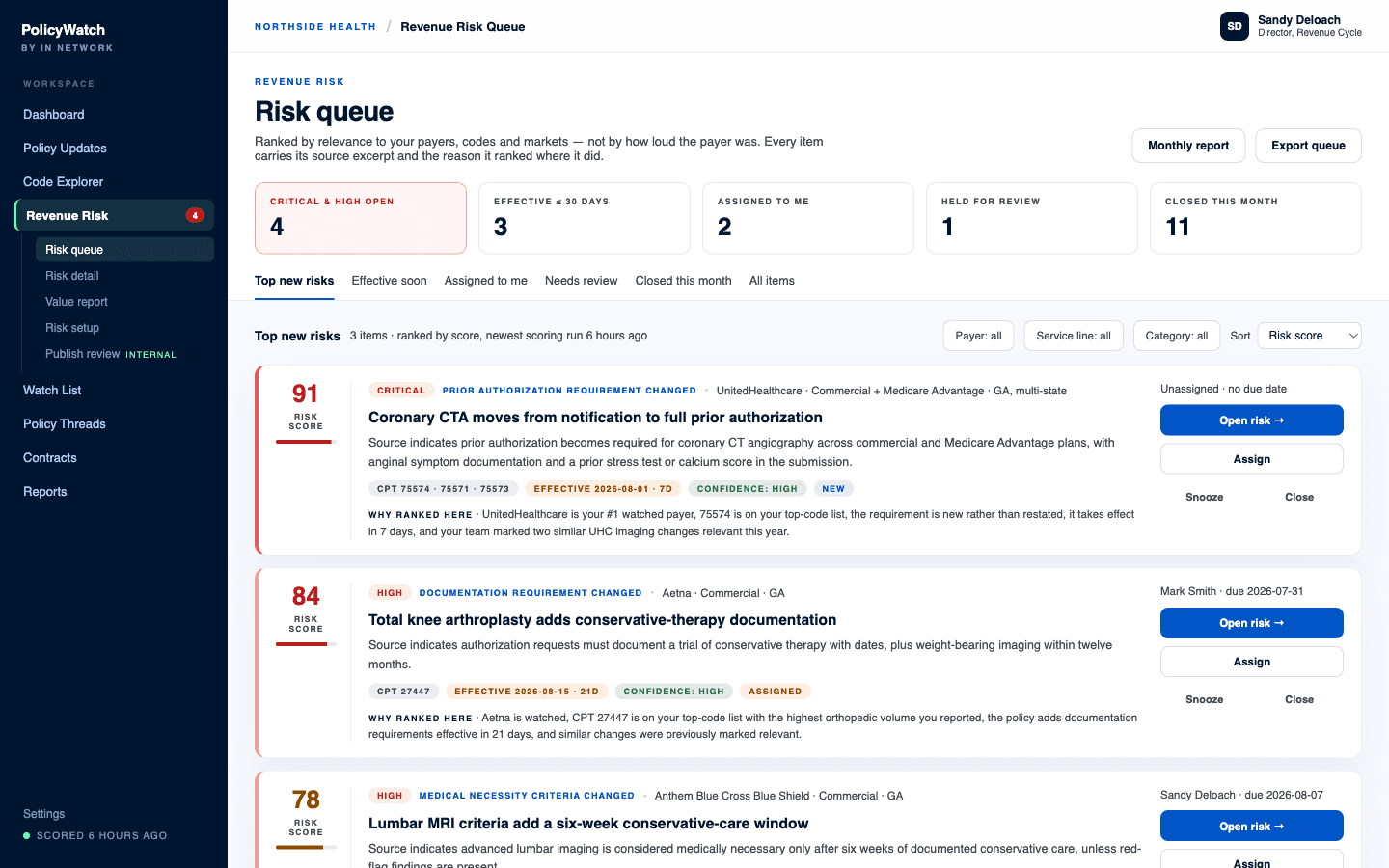
The Revenue Risk Queue, sorted by risk score.
Ranked against your configuration, not the payer's volume
The score is built from the things you told us matter: which payers you watch, which codes carry your volume, which states you operate in, how soon a change takes effect, and how your team has treated similar changes before. A busy payer does not outrank a quiet one that just moved a code you bill every day.
- Relevance: watched payer, top-code match, state and market match
- Impact: service-line volume and contract rate where you have provided them
- Urgency: how close the effective date is
- Confidence: how strongly the source supports the extraction
- Recurrence: whether this payer keeps doing this
Every rank explains itself in a sentence
Each item carries a “why ranked here” line written in plain English — the payer is watched, the code is on your top-code list, the requirement is new rather than restated, it takes effect inside the month, and your team marked similar changes relevant before. A number nobody can interrogate is a number nobody trusts.
Source first, model second
No black-box scoring, and no summary that cannot be traced back to a payer's own sentence. Every risk item shows its evidence before it shows its recommendation.
- Official source URL, payer name, and document title
- The exact excerpt the item was built from
- Capture date, effective date, and last verified timestamp
- A confidence label, and a change comparison where a prior version exists
- Low-confidence items are held for internal review before they reach your queue
Categories that map to real work
Items are typed by what the payer actually did, so the queue can be split along the lines your team is already organized around — prior auth, coding, documentation, contracting.
- Prior authorization requirement changed
- Medical necessity criteria changed, coverage limitation changed
- Documentation requirement changed, coding or modifier requirement changed
- Site-of-service rule changed, claims submission requirement changed
- Appeal or dispute process changed, reimbursement note changed
- Contract-renewal leverage item — saved for the meeting rather than worked today
Owned through resolution, not just acknowledged
An alert you read is not work you did. Items move through a status track with an owner and a due date, and they close with a reason — which is what makes the queue a defensible record instead of a reading list.
- New, triage, assigned, in progress, waiting on payer, waiting internally, resolved
- Dismiss, snooze, and archive, each with a recorded reason
- Closure outcomes: staff guidance updated, prior-auth process updated, billing or coding process updated, payer contacted, claim or appeal initiated, contract note created, false positive
- Dismissals feed relevance tuning, so the queue gets quieter as you use it
The monthly value report
At the end of every month the queue produces its own proof: what was detected, what was worked, and what is still open. It is the document that answers “what did this find for us?” without anyone assembling it by hand — and exposure is shown in bands only where your own volume and rate data supports it.
- Risks detected, and how many were critical or high
- Items closed, by payer, service line, and owner
- Actions taken, with the evidence attached
- Unresolved backlog carried into next month
One source of truth, one loop.
The queue is where detection becomes work. PolicyWatch finds the change and Code Explorer maps it to codes and requirements; Revenue Risk Queue decides whether it matters to you, ranks it against everything else on the list, and gives it an owner. Contract Cabinet raises an item's rank when the payer's renewal or notice deadline is close, Market Rates adds reimbursement context to the codes involved, and every item you close becomes evidence a Negotiation Packet can cite at renewal.
What buyers ask about Revenue Risk Queue.
Do we have to upload claims or denial data?
What stops a low-confidence item from wasting our time?
How is this different from the alerts we already get?
Put Revenue Risk Queue on your payers.
Material changes ranked into an owned work queue — money at risk, not a feed to scroll.
Want to see it for yourself first? Try Policy Finder — free.